Tech News
HDMI Switcher vs Splitter: What’s the Difference and Which One Do You Need?
When building an AV setup, it is easy to confuse devices that seem similar at first glance. However, understanding the difference between a HDMI switcher, a splitter, and a matrix switcher is essential for choosing the right solution. Each serves a different purpose, and the best option depends on how many source devices and displays you need to manage.
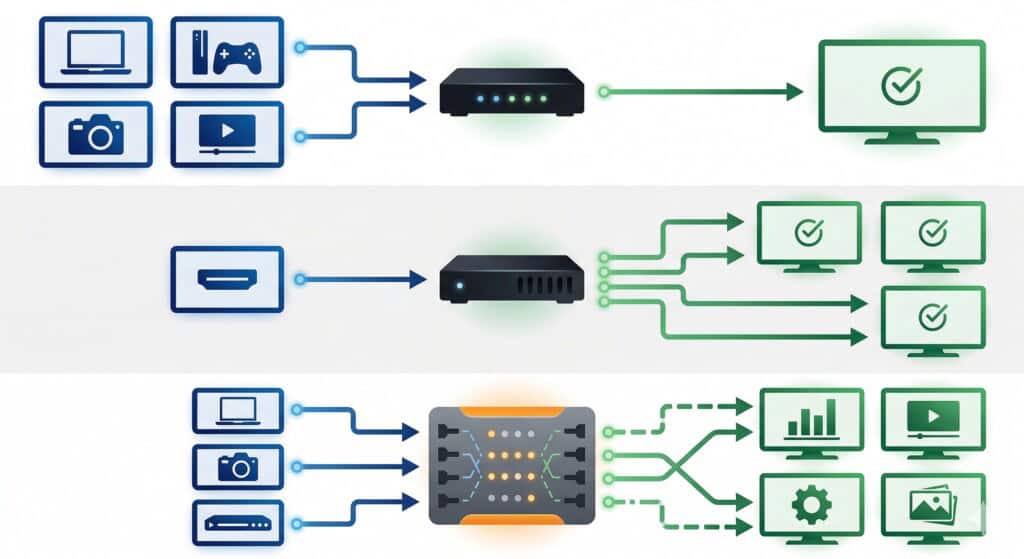
What an HDMI Switcher Does
An HDMI switcher is designed to connect several source devices to one display. For example, if you want to use a laptop, gaming console, and media player with a single monitor or TV, a switcher makes it easy to choose between them without constantly unplugging cables.
Its main benefits include:
- connecting multiple HDMI sources to one screen;
- simplifying input selection;
- reducing cable wear from repeated reconnection;
- keeping small AV setups organized;
- supporting cleaner installation in tight spaces.
This makes HDMI switchers a practical choice for home theaters, classrooms, and small meeting rooms.
How a Splitter Differs from a Switcher
A splitter performs the opposite role. Instead of sending several sources to one display, it sends one source to multiple displays at the same time. This is useful when the same content must appear on several screens simultaneously.
A splitter is often used for:
- duplicating one signal across multiple displays;
- retail displays showing the same promotion;
- waiting rooms or public information screens;
- simple presentation setups with mirrored output.
In short, a switcher selects between multiple inputs, while a splitter duplicates one input to several outputs.
When a Matrix Switcher Is the Better Choice
A matrix switcher is more advanced because it allows multiple sources to be routed independently to multiple displays at the same time. This provides much greater flexibility in professional AV environments where different screens may need different content.
Common advantages include:
- routing different sources to different displays;
- supporting larger and more complex AV systems;
- improving control in multi-room environments;
- allowing flexible switching for changing needs;
- making future expansion easier.
Matrix switchers are especially useful in control centers, boardrooms, digital signage networks, and live event venues.
How to Choose the Right Device for Your Setup
The best choice depends on the structure of your system and how content needs to be displayed. Before buying, it is important to evaluate the technical requirements of the installation.
Consider these factors:
- the number of source devices you need to connect;
- the number of displays involved;
- required resolution support, such as Full HD or 4K;
- control options, including remote or automated switching;
- future scalability if the system may grow.
Both HDMI switchers and matrix switchers improve connectivity, reduce cable clutter, and make AV management more efficient. For simple one-display setups, a switcher is often enough. For more advanced environments with several screens and sources, a matrix switcher offers the flexibility needed for professional performance.


How Nevada Rules Shape a Personal Injury Claim After a Crash

A Yard-Watering Plan: Match Soil, Plants, and Sprinklers Before You Turn On the Timer

A Practical Coastal Home Buying Checklist in Panama City, Florida

Piso Wifi 10.0.0.1 Pause Time – Complete Guide

High-Risk Threats Targeting Banks and How to Mitigate Them
